

HMRC Crypto Tax Reporting: How to Report Crypto on Taxes in 2026
You need to report your crypto in your self-assessment tax return by the 31st of January 2027 using the Government Gateway service (or forms SA108 and SA100 by October 31st). Learn how to get your HMRC crypto tax reporting done in our simple five-step guide on how to report crypto on taxes.
Investors report crypto gains, losses, and income online or using forms SA108 and SA100
Crypto income is reported as other income, and there is a dedicated crypto assets section for capital gains and losses
A crypto tax calculator like Koinly can help you with calculations and generate HMRC crypto tax reports
How to report crypto on taxes
You’ll report all your crypto as part of your Self Assessment Tax Return. You’ll report income from crypto in the Self Assessment Tax Return (SA100), and you’ll report any capital gains or losses from crypto in the Self Assessment: Capital Gains Summary (SA108).
You need to file your Self Assessment Tax Return online with HMRC by the 31st of January 2027. The deadline for paper tax returns is the 31st of October 2027.
Any crypto investor who made more than £1,000 in crypto income or more than £3,000 in capital gains for the 2025/2026 financial year must submit a Self Assessment Tax Return to HMRC.
To report your crypto tax to HMRC, follow these 5 steps:
Calculate your crypto tax. You need to know your capital gains, losses, income, and expenses.
Register to file taxes online with the Government Gateway service by the 5th of October 2026 if you’re not already registered.
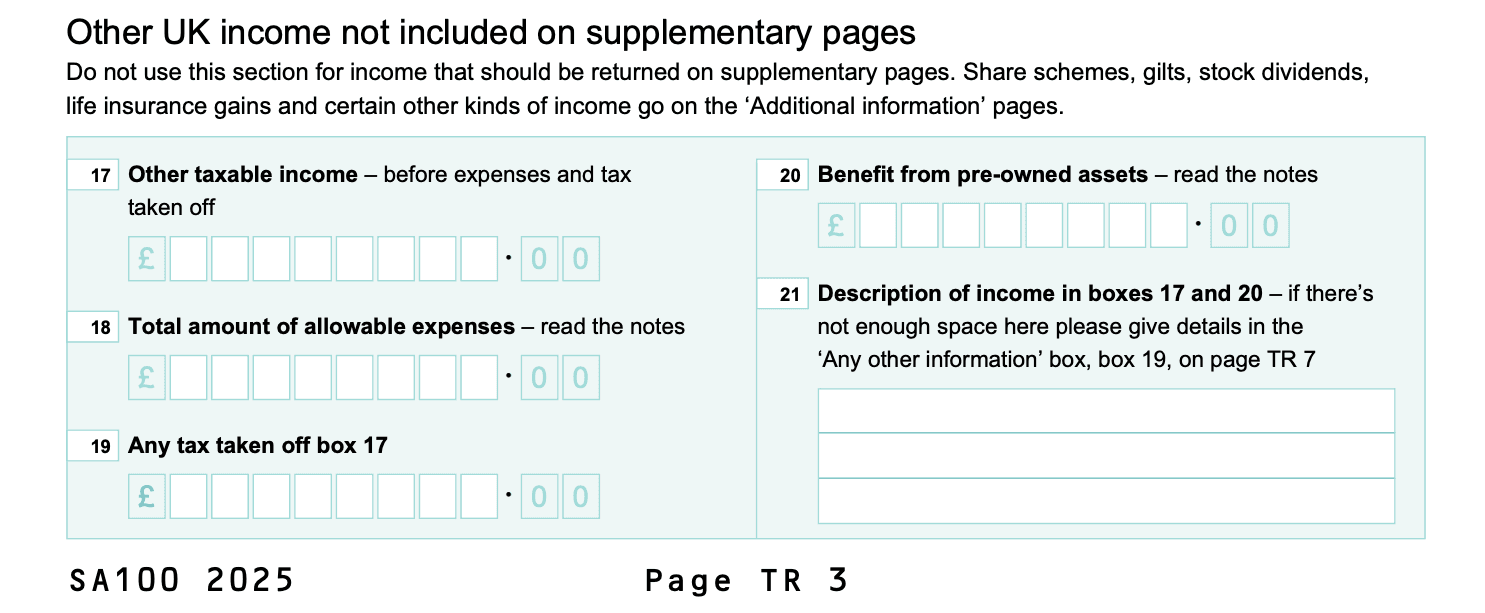
Fill out the Self Assessment Tax Return (SA100). Report any income from crypto in box 17.
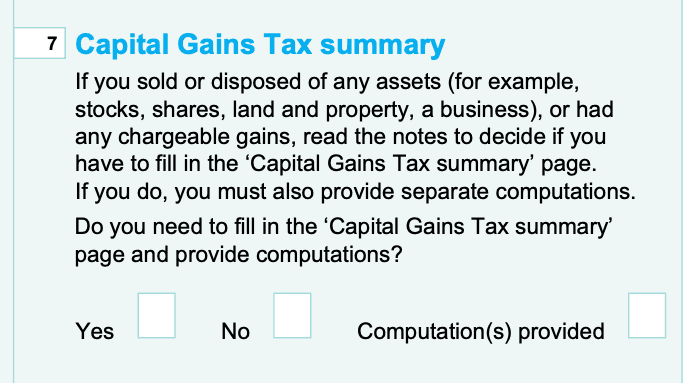
If you made crypto capital gains, check yes on box 7. Fill out the supplementary Self Assessment: Capital Gains Summary (SA108).
Submit your Self Assessment Tax Return online to HMRC by midnight on the 31st of January 2027. You’re done!
This all sounds straightforward enough, but knowing how to fill out these forms can get confusing, so follow our step-by-step guide below.
Calculate your crypto taxes
Before you can report your crypto tax to HMRC, you need to do the math. This means you’ll need to calculate your crypto totals for:
Capital gains from crypto
Capital losses from crypto
Income from crypto
Any allowable expenses relating to your investments
Crypto tax software like Koinly makes this step simple. Just sync your crypto wallets, and Koinly does all the work for you using the UK share pooling cost basis method.
If you’re not using Koinly, you’ll need to do this step manually. You can use our UK crypto tax guide to learn how crypto is taxed in the UK. Once you’ve got your figures ready, it’s time to register and fill out your Self Assessment Tax Return.
Register online for HMRC crypto tax reporting
If you’re submitting your Self Assessment Tax Return by post, you can skip this step and go straight to step 3. Keep in mind you have an earlier deadline of October 31st. If you’ve registered to file a Self Assessment Tax Return online before, you don’t need to do this again.
For crypto investors who haven’t filed a Self Assessment Tax Return online before, you need to register by the 5th of October. The steps are slightly different depending on whether you’re self-employed or not.
Self-employed
If you're self-employed, sign in to your business tax account and add Self Assessment. You'll need your Government Gateway user ID and password to do this, so you might need to create one. You'll get a letter with your Unique Taxpayer Reference within 10 days (or 21 days if you're abroad). You'll get a second letter with the activation code for your account. Once your account is activated, you can file your tax return anytime before the 31st of January.
Not self-employed
If you’re not self-employed, register using form SA1. Once you've registered, you'll get your UTR within 10 days (or 21 if you're abroad). Create your online account using your UTR and sign up for Self Assessment online. You'll get an activation code sent to you in the post within 7 days of signing up (or 21 days if you're abroad). Once your account is activated, you can file your tax return anytime before the 31st of January.
Though the deadline to file your taxes online is the 31st of January, this is also the deadline to pay your balancing payment and your first payment on account. Your balancing payment covers any taxes you haven’t paid already throughout the year.
For this reason, we recommend that you file your taxes well ahead of the 31st of January to ensure you’re not left in the lurch with a large tax bill!
Report crypto income in SA100
The Self Assessment Tax Return (SA100) is where you’ll report your crypto taxes. Let’s go through it step-by-step.
Report any crypto income in box 17.
Report any allowable expenses related to your crypto income in box 18.
Give a description of the income in box 21. For example, "ETH staking rewards”. This box is quite small, so if you need more space, you can use the "any other information" section further down your tax return.
SA100 Example
If you’ve made any capital gains or losses, you’ll also need to check yes on box 7. You’ll also need to fill out the Self Assessment: Capital Gains Summary SA108 supplementary form.
SA100 Example
Fill out the rest of the Self Assessment Tax Return as it relates to your circumstances and income.
Capital Gains Summary (SA108) for crypto assets
The Self Assessment Capital Gains Summary SA108 is where you’ll report your crypto capital gains and losses. It's a supplement to the Self Assessment Tax Return, so you’ll submit both together.
There is now a dedicated Cryptoassets reporting section in this form. You'll report relevant info from your crypto transactions between boxes 13.1 and 13.8.
We’ll break down each section.
SA108 Example
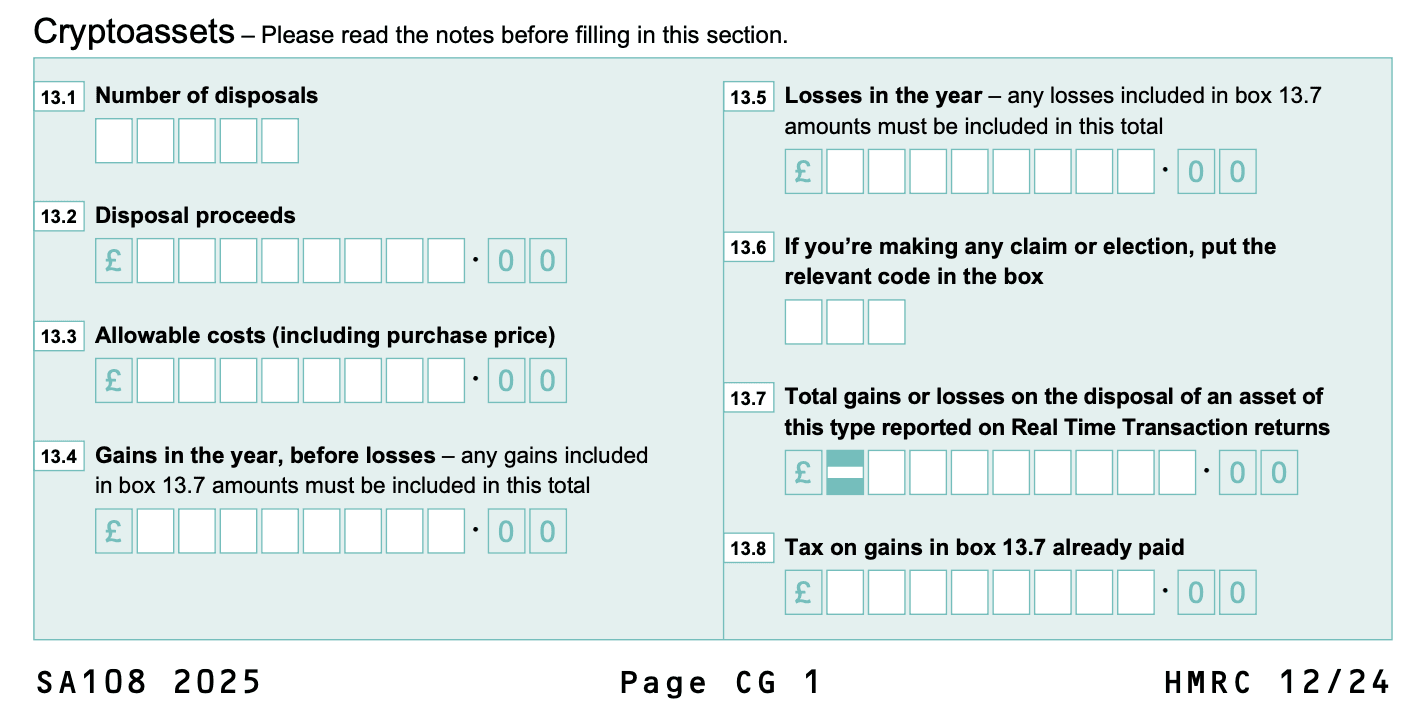
Report the number of disposals of crypto you made in box 13.1
Report your disposal proceeds in box 13.2
Report your allowable costs (including your cost basis) in box 13.3
Report your total gains for the financial year in box 13.4
Report your total losses for the financial year in box 13.5
Add any relevant claim or deduction code in box 13.6
Report any total gains or losses already reported with the real-time transaction returns service in box 13.7
Report any tax already paid on box 13.7 in box 13.8
Fill out the rest of the Self Assessment Capital Gains Summary SA108 form as it relates to your circumstances and investments.
Submit your Self Assessment Tax Return to HMRC
Once you’ve filled out both of these forms, you’re done. All you need to do is press submit, and your crypto taxes for the year are complete!
After you’ve submitted, HMRC will calculate your taxes and let you know how much you need to pay.
If you’re up to date with your tax bill, you’ll be able to do this in installments. If you’re behind on your taxes, you’ll have to pay this amount upfront before you can set up a Self Assessment Tax installment plan.
HMRC crypto tax reporting with Koinly
Reporting crypto taxes to HMRC is simple with a crypto tax calculator.
Just import your crypto transaction history from all the crypto wallets, exchanges, and blockchains you use using API integration or by importing CSV files.
Koinly then calculates all your capital gains, losses, crypto income, and expenses for you. Once it’s done, head to the tax report page in your Koinly account.
You’ll find a simple summary of your crypto taxes, as well as a variety of tax reports you can download and use to file your taxes with HMRC, like the HMRC Capital Gains Summary form.


