
What is Cardanoscan and How to Use it
Cardanoscan is a blockchain explorer for the Cardano network, allowing users to track transactions, monitor stake pools, view wallet activity, and analyze on-chain data.
This guide covers what Cardanoscan is and how to use it, whether you want to verify a transaction or use it as an analytic tool for strategy development.
What is Cardanoscan?
Cardanoscan is a community-built and user-friendly blockchain explorer designed specifically for the Cardano network. It allows users to find detailed information on Cardano-based transactions, wallets, block history, tokens, the number of active stake pools, and more. Users can then use this to analyze on-chain trends to build their strategy.
What is Cardanoscan used for?
Cardanoscan can be used for a variety of purposes, from blockchain analysis to strategy development. This includes:
Tracking transactions and details: View detailed transaction information, including the sender, recipient, fees, timestamp, transaction status, and unspent transaction outputs (UTXO).
Staking analytics and staking pools: You can view active stake pools, monitor their performance metrics, assess network health, and track reward distribution.
Manage tokens: Search for and monitor native tokens and NFTs across the Cardano network.
UTXO Visualization: Cardano uses the UTXO model, which represents wallet balances as individual unspent outputs rather than a single balance, essentially splitting the wallet into multiple addresses. Cardanoscan makes it easier for users to understand these outputs.
How does Cardanoscan work?
Cardanoscan uses specialized nodes to sync with the Cardano blockchain. These nodes retrieve and decode the data, then display it in a user-friendly and searchable format on Cardanoscan. All of the data that you can find on a Cardano blockchain explorer is publicly available. Cardanoscan just becomes the intermediary between complex blockchain data and users.
How to look up transactions on Cardanoscan
To look up transactions on Cardanoscan, you need to:
Find the transaction hash: Go to your transactions in your Cardano wallet, expand the details of the specific transaction, and copy the transaction hash.
Paste in search bar: Go to the Cardanoscan search bar, paste the transaction hash, and press enter.

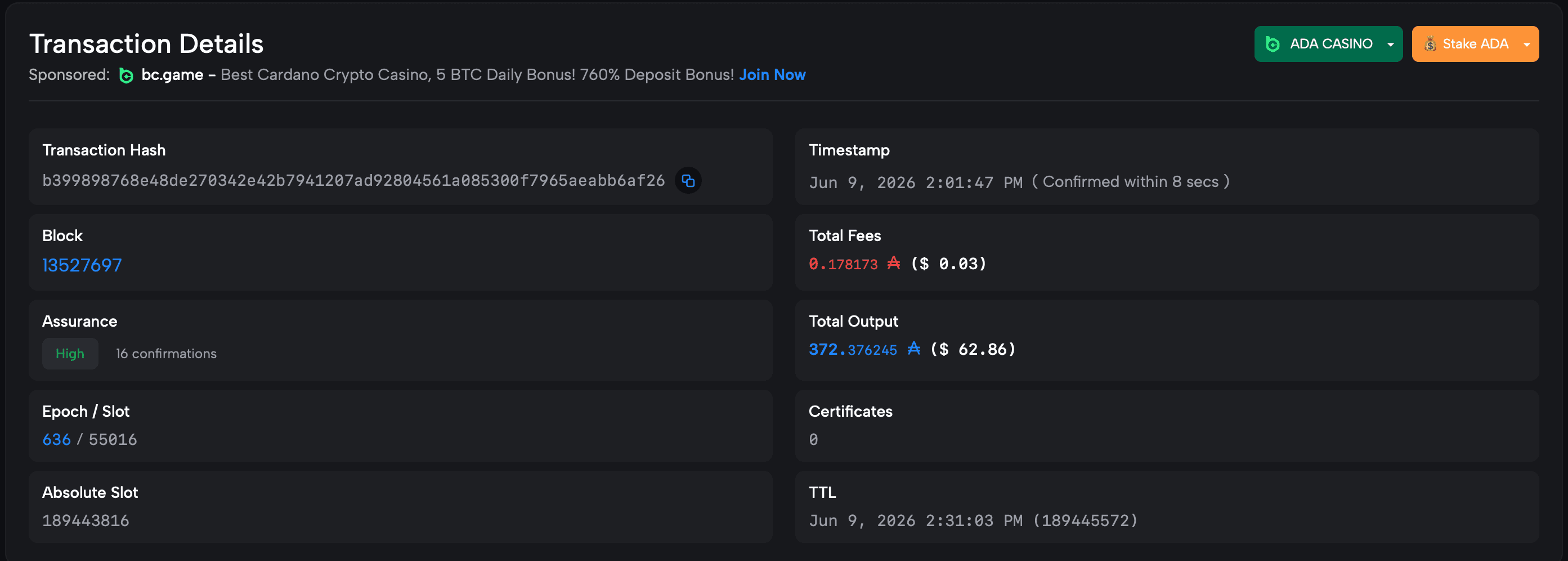
View the transaction: Cardanoscan will show the transaction details, including its assurance, fees, the wallet it was sent by and sent to, and the time it was sent.
What transaction details are on Cardanoscan?
Here are some of the key details that Cardanoscan will display for each transaction:
Transaction Hash: The unique identifier assigned to each transaction, also known as the transaction ID.
Block: The block in which the transaction was verified. You can click into the block to see the which stake pool (slot leader) validated the block.
Assurance: This shows how many other Cardano nodes (outside of the slot leader) have confirmed it. This will either be low, medium, or high. High assurance ensures that the block will exist on the blockchain forever.
Epoch and slot: Showing which epoch the transaction happened and within which slot.
Absolute slot: The slot since the creation of the blockchain.
Timestamp: The exact time that the transaction was processed.
Fees: Any costs associated with the transaction.
Total output: The transaction value. This is usually higher than the actual transaction due to the use of UTXOs.
TTL: How long the transaction can be alive for. If it is not on the blockchain by this time, it is usually retracted.
Understanding transaction UTXOs on Cardanoscan
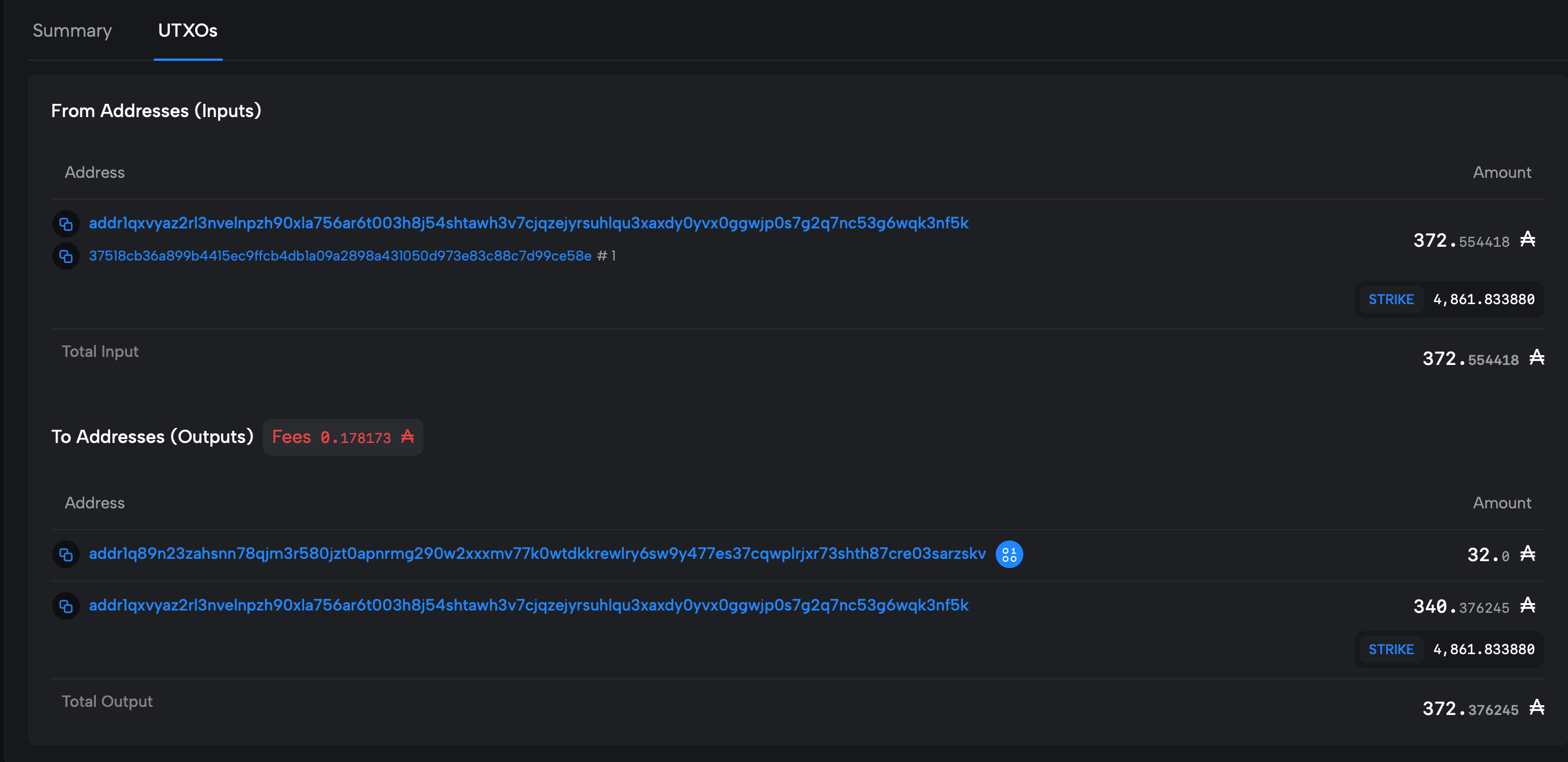
The ‘Total Output’ displayed on a transaction in Cardanoscan will often be a higher number than the actual amount sent. This is because Cardano uses UTXOs, which are essentially collections of tokens with separate addresses that make up one wallet.
To better visualize it, imagine you have a physical wallet with a $1 bill, two $5 bills, and a $20 bill. You have a total of $35, but it is split among four different bills. Each bill is basically a wallet address.
If you go to purchase an item for $7 and you use the $20 bill from your wallet, the cashier cannot split the bill, so they will take the entire bill and hand you back $13.
It’s similar for UTXOs: it spends the entire UTXO rather than splitting it. So, if you send 7 ADA, the entire 20 ADA UTXO will be spent, and a new UTXO of 13 ADA will be created in your wallet.
To see this information, scroll down on the transaction page, and you will find the UTXOs tab. This will display the total input and output.
How to look up wallets on Cardanoscan
To look up a wallet on Cardanoscan, just:
Copy wallet address: You need either a receiving address, which usually starts with ‘addr1,’ or your stake key, which starts with ‘stake1’.
Paste wallet address: In the Cardanoscan search bar, paste the wallet address and press search.

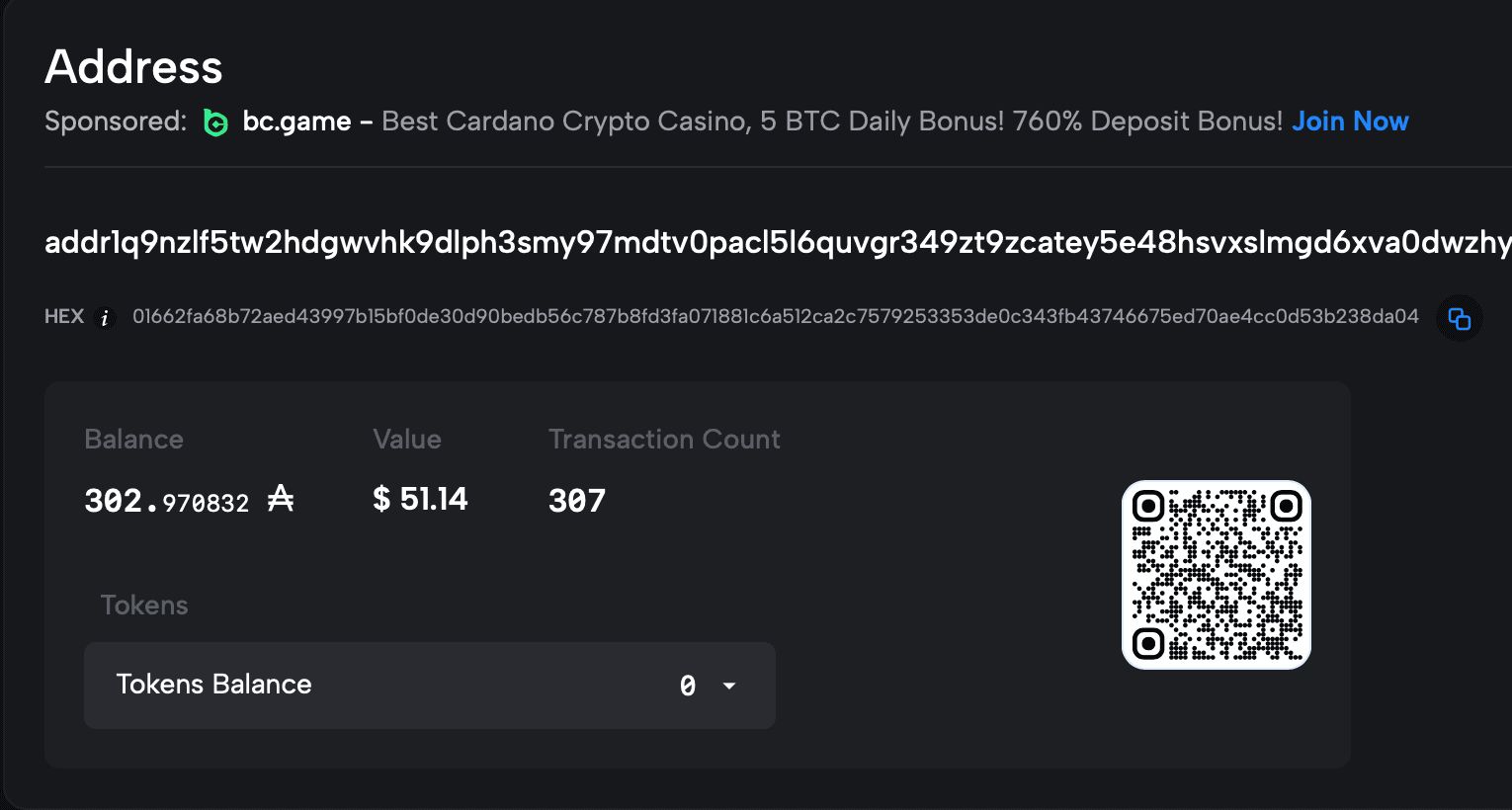
View information: Cardanoscan will show you key information about the wallet, including the balance, the value in USD, the transaction count, and information on tokens currently held by that wallet.
Understanding UTXOs for wallets on Cardanoscan
Cardano splits wallets into multiple wallet addresses. Meaning if you are viewing a wallet on Cardanoscan, you may only be looking at one wallet address, rather than the wallet as a whole.
You can scroll down on the wallet information to see the ‘Controlled Stake Key’ section. 'Controlled Total Stake' shows the total balance that the wallet holds. By selecting the ‘View all addresses’, Cardanoscan will show a list of all wallet addresses attached to that wallet and how the total balance is split across them.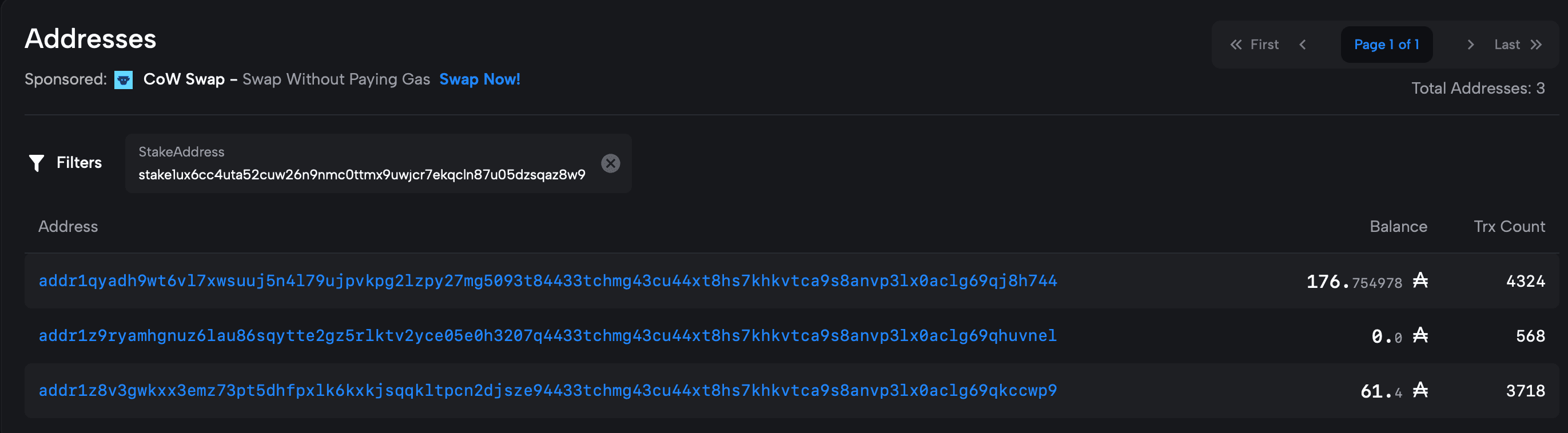
How to use Cardanoscan for on-chain analysis
Cardanoscan can be utilized alongside other tools to conduct on-chain analysis. Here are a few ways to use it.
Whale tracking: You can monitor the activity of wallets that hold large amounts of ADA, and identify any patterns that may influence the market.
Trend analysis: You can track the popularity of dApps and NFTs on Cardano, as well as look at whether transactions are increasing or decreasing.
Market sentiment: By analyzing the flow of ADA, in and out of exchanges, you can discern whether market conditions are bearish or bullish.
Cardanoscan alternatives
Several Cardano blockchain explorers offer functionality similar to Cardanoscan, but are better utilized in different ways. Here are two popular alternatives:
Cexplorer.io: Widely used and known as a user-friendly tool for deeper data analysis.
AdaStat: This Cardano explorer is recommended for analysts and researchers who need more advanced blockchain statistics.
Cardanoscan alternatives compared:
| Feature | Cardanoscan | Cexplorer.io | AdaStat |
|---|---|---|---|
| Real-time data | ✔ | ✔ | ✔ |
| Historical data | ✘ (limited) | ✔ | ✔ |
| Rich transaction detail | ✔ | ✔ | ✔ |
| Customizable | ✘ | ✔ | ✔ |
| Best for | Day-to-day transaction searches | Staking research and network monitoring | Developers and researchers looking for more in-depth tracking |
Use a Cardano portfolio tracker
Using a Cardano portfolio tracker can help you manage your Cardano transactions. Koinly offers free, user-friendly, and comprehensive portfolio management, including transactions, balances, gains, losses, and more.


